Technical SEO Audit for Webflow Sites: A Step-by-Step Guide

Generic SEO audit tools miss critical Webflow-specific issues that can tank your search rankings. After conducting technical SEO audits for Webflow sites for over six years, I've seen how platform-specific problems slip through standard audit processes—from collection template canonicalization issues to CMS-bound images that never get optimized.
A proper technical SEO audit for Webflow sites requires understanding both general technical SEO principles and Webflow's unique architecture. This guide walks you through the specific steps, tools, and decision frameworks I use when auditing Webflow projects.
Why Webflow Sites Need Specialized Technical SEO Audits
Webflow's visual development approach creates unique technical challenges that generic audit tools can't identify. While tools like SEMrush or Ahrefs catch obvious issues, they miss the nuanced problems that emerge from Webflow's CMS structure and component-based design.
The most common blind spot I encounter is collection page canonicalization. Webflow automatically generates canonical tags for CMS pages, but when you have multiple collection templates or filtering systems, these can create duplicate content issues that standard crawlers interpret as normal site architecture.
Dynamic content indexing presents another challenge. Webflow's CMS excels at content management, but I've audited sites where entire product catalogs weren't being indexed because of improper URL structure in collection settings—something that only shows up when you understand Webflow's specific URL generation logic.
| Audit Approach | Catches Webflow CMS Issues | Identifies Component Problems | Technical Crawl Analysis | Platform Context |
|---|---|---|---|---|
| Generic SEO Tools | Partial | No | Yes | None |
| Webflow-Specific Audit | Yes | Yes | Yes | Full |
| Hybrid Approach | Yes | Partial | Yes | Good |
Webflow's built-in audit panel provides a starting point, but it focuses primarily on basic on-page elements and misses technical crawling issues entirely. I've found sites with perfect audit panel scores that had serious indexing problems invisible to Webflow's native tools.
The 5-Step Webflow Technical SEO Audit Framework
My approach combines Webflow's native tools with external analysis, structured around understanding how Webflow's architecture impacts search performance. This isn't about checking boxes—it's about identifying the specific technical barriers preventing your Webflow site from ranking.
Step one involves extracting maximum value from Webflow's audit panel while documenting its limitations. I start here because it's immediate and highlights issues that clients can easily understand and track progress against.
External crawling tools form step two, but configuration matters enormously for Webflow sites. Screaming Frog needs specific settings to properly crawl collection pages and handle Webflow's URL structure. I configure it to respect Webflow's sitemap format and crawl depth appropriate for CMS-generated content.
The Core Web Vitals assessment in step three focuses on Webflow's hosting environment and platform-specific optimization opportunities. Since 53% of mobile visitors abandon sites taking longer than 3 seconds to load, understanding how Webflow's CDN and image optimization affect your metrics becomes critical.
Step four examines CMS-specific elements that generic tools can't evaluate: collection template SEO settings, dynamic URL generation, and how CMS fields map to meta elements. This requires working directly in Webflow's CMS interface.
Finally, step five creates an implementation priority matrix that accounts for Webflow's interface limitations and development constraints. Not every fix requires custom code, but knowing which ones do affects your timeline and budget.
Using Webflow's Built-in Audit Panel (And Its Blind Spots)
Webflow's audit panel excels at catching basic on-page issues: missing meta descriptions, broken internal links, and image alt text gaps. It provides immediate feedback within the designer interface, making it valuable for ongoing optimization work.
However, the panel's scope limitations create dangerous blind spots. It doesn't analyze your site's crawlability, index status, or Core Web Vitals performance. I've audited sites with perfect panel scores that weren't ranking because Google couldn't properly crawl their collection pages.

The most significant gap involves component-based design issues. When you build with Webflow components, SEO problems can be embedded in the component structure and replicated across multiple pages. The audit panel evaluates individual pages but doesn't identify systemic component issues.
CMS-bound images present another blind spot. The panel might flag missing alt text, but it won't identify when CMS images aren't being optimized for Core Web Vitals or when dynamic content isn't generating proper structured data.
To supplement the audit panel effectively, I cross-reference its findings with Google Search Console data. This reveals the gap between what Webflow thinks is optimized and what Google actually sees when crawling your site.
Essential Technical SEO Tools for Webflow Sites
Tool selection for Webflow SEO audits requires understanding how each tool interacts with Webflow's hosting environment and CMS structure. Not all SEO tools handle Webflow sites equally well.
| Tool | Webflow Compatibility | Best Use Case | Cost | Key Limitation |
|---|---|---|---|---|
| Google Search Console | Excellent | Index status, Core Web Vitals | Free | Historical data only |
| Screaming Frog | Good (with config) | Technical crawl analysis | £149/year | Requires Webflow-specific setup |
| PageSpeed Insights | Excellent | Performance testing | Free | Single page analysis |
| SEMrush Site Audit | Fair | Comprehensive overview | $119+/month | Misses CMS-specific issues |
Google Search Console remains the foundation because it shows exactly how Google perceives your Webflow site. The Core Web Vitals report is particularly valuable since Webflow's hosting environment and CDN setup directly impact these metrics.
Screaming Frog requires careful configuration for Webflow sites. I set it to follow Webflow's sitemap structure and configure crawl depth to properly analyze collection pages. The key is understanding that Webflow generates certain URLs dynamically, so you need to ensure your crawl settings account for this.
For paid tools, I prefer focused solutions over comprehensive suites when auditing Webflow sites. A specialized Core Web Vitals tool often provides more actionable insights than a general SEO platform that treats Webflow like any other CMS.
Common Webflow-Specific Technical Issues
Collection template problems represent the most frequent technical issue I encounter in Webflow SEO audits. When you create CMS collections, Webflow generates template pages that can create unintended duplicate content or canonicalization issues.
The classic example involves product catalogs with multiple collection templates. You might have a main product template and a sale product template, both pulling from the same CMS collection. Without proper canonical configuration, Google sees duplicate content across multiple URLs.
Dynamic content indexing failures occur when collection URL slugs don't follow SEO best practices. Webflow auto-generates slugs from your CMS field content, but if that content includes special characters or exceeds optimal length, you get URLs that don't index well.
I've seen e-commerce sites lose thousands in revenue because their product URLs were auto-generated from names like "Product #1 - Blue/Large (Limited Edition!)" creating slugs like "product-1-blue-large-limited-edition" that Google struggled to interpret and rank.
CMS slug generation becomes particularly problematic for sites with international content or special characters. Webflow's URL generation doesn't always handle these gracefully, creating crawlability issues that only surface during technical audits.
Component-based design can embed SEO problems at scale. When you create a component with suboptimal heading structure or missing schema markup, that issue replicates across every page using that component. Standard audits catch individual instances, but Webflow-specific audits identify the root component issue.
Site Speed Optimization in the Webflow Environment
Webflow provides robust built-in optimizations, but understanding what's automatic versus what requires manual intervention determines your Webflow site speed optimization success. The platform handles basic image compression and CDN delivery automatically, but advanced optimization requires strategic manual work.
Image optimization through Webflow works well for static images uploaded through the designer, but CMS-bound images often need additional attention. When clients upload images through CMS forms, they bypass some of Webflow's automatic optimization processes.
I've found that a 0.1-second improvement in speed can increase conversions by 8.4% for retail sites, making even small Webflow-specific optimizations highly valuable. The key is identifying which optimizations Webflow handles automatically and which require manual intervention.
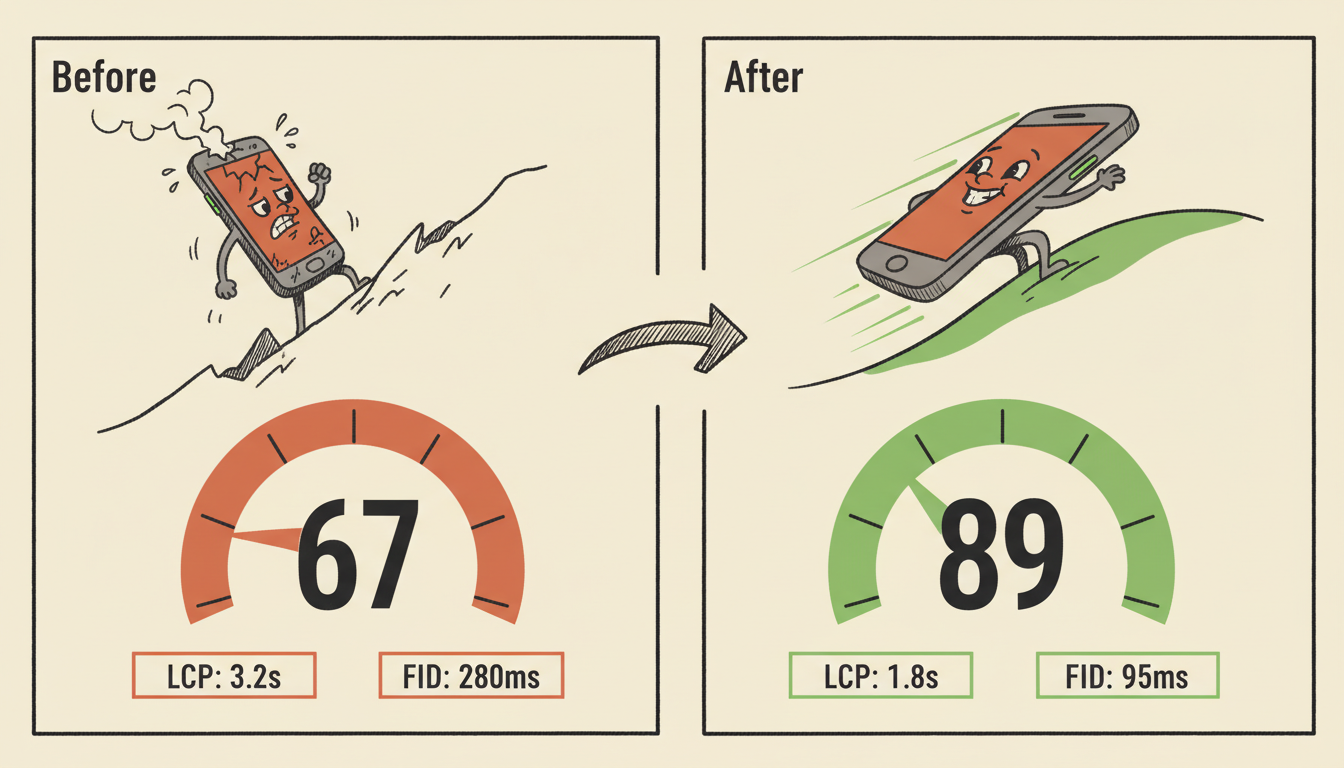
CSS and JavaScript optimization within Webflow's constraints requires understanding the platform's asset delivery system. While you can't modify Webflow's core CSS delivery, you can optimize custom code placement and minimize render-blocking resources through strategic implementation.
Mobile performance deserves special attention for Webflow sites because the platform's responsive design system can sometimes create resource loading inefficiencies. I focus on optimizing images for Core Web Vitals since image-related issues cause most Webflow mobile performance problems.
CDN and hosting considerations become crucial when clients want custom domains or specific geographic performance requirements. Webflow's hosting performs well globally, but understanding its limitations helps set proper expectations and identify when additional CDN layers make sense.
Prioritization Framework: What to Fix First
Technical SEO audit findings need systematic prioritization because fixing everything simultaneously isn't practical or cost-effective. I use a framework that balances impact potential with implementation complexity within Webflow's interface constraints.
| Priority Level | Issue Type | Implementation Effort | Expected Impact | Timeline |
|---|---|---|---|---|
| Critical | Crawling/Indexing blocks | Low-Medium | High | Immediate |
| High | Core Web Vitals failures | Medium | High | 1-2 weeks |
| Medium | On-page optimization gaps | Low | Medium | 2-4 weeks |
| Low | Enhancement opportunities | Variable | Low-Medium | Ongoing |
Critical issues always involve problems that prevent Google from properly crawling or indexing your content. These include broken sitemaps, incorrect robots.txt settings, or collection pages that aren't being discovered. These fixes usually require minimal effort but have maximum impact.
High-priority issues focus on Core Web Vitals and user experience metrics that directly affect search rankings. Since Google uses these as ranking factors, addressing LCP, FID, and CLS problems delivers measurable results.
Medium-priority optimizations include on-page elements like meta descriptions, heading structure improvements, and schema markup additions. These contribute to ranking improvements but don't block basic site functionality.
Low-priority enhancements cover opportunities like additional structured data, advanced internal linking optimizations, or nice-to-have speed improvements. These get addressed after higher-impact issues are resolved.
ROI-based decision making becomes crucial when budget constraints exist. I calculate potential traffic impact versus implementation cost to help clients make informed decisions about which optimizations justify their investment.
DIY vs Professional Audit: When to Call in the Pros
DIY Webflow SEO audits work well for straightforward sites with basic technical requirements. If you're comfortable navigating Webflow's interface and can interpret Google Search Console data, you can identify and fix many common issues yourself.
The DIY approach makes sense for small business websites, portfolio sites, or simple e-commerce stores without complex CMS structures. You can handle basic optimization tasks like meta descriptions, image alt text, and simple speed improvements without external help.
However, warning signs indicate when professional help becomes necessary. Complex CMS implementations, custom code integrations, or persistent technical issues that resist DIY solutions require specialized expertise.
| Scenario | DIY Suitability | Professional Recommended | Key Factors |
|---|---|---|---|
| Basic business site (10-50 pages) | High | No | Simple structure, standard optimization needs |
| E-commerce (100+ products) | Medium | Maybe | CMS complexity, conversion impact |
| Enterprise/Custom integrations | Low | Yes | Technical complexity, business risk |
| Persistent ranking issues | Low | Yes | Requires deep technical analysis |
Professional SEO audits typically cost $2,500 to $10,000+, while businesses with sites generating over $5,000 monthly revenue should consider professional audits non-negotiable. The cost-benefit analysis becomes clear when you consider potential revenue impact from technical improvements.
What you get varies significantly across price tiers. A $500 audit might provide a basic checklist, while a $5,000+ engagement includes detailed implementation guidance, custom code recommendations, and ongoing support.
For Webflow users specifically, look for professionals who understand the platform's architecture. Generic SEO consultants often miss Webflow-specific opportunities or recommend fixes that aren't feasible within the platform's constraints.
If you're considering a professional audit, get a detailed scope that specifies which Webflow-specific elements will be analyzed and what deliverables you'll receive.
Implementing Fixes Within Webflow's Interface
Implementation success depends on understanding exactly where each optimization lives within Webflow's interface. Unlike WordPress or custom-built sites, Webflow's visual approach means SEO settings are distributed across different panels and interfaces.
Basic on-page optimizations happen in the Designer's Settings panel for each page. Meta titles, descriptions, and Open Graph settings all live here. But collection template optimization requires working in the CMS interface, where you configure how dynamic content generates these elements.
Site-level optimizations require the Site Settings area, where you configure global elements like sitemaps, robots.txt, and redirects. Understanding the hierarchy between page-level settings and site-level defaults prevents conflicts and ensures consistent implementation.
CMS field configuration for SEO becomes critical for content-heavy sites. You need to map CMS fields to meta elements properly and ensure that dynamic URLs generate SEO-friendly slugs. This requires understanding both CMS field types and how they interact with Webflow's template system.
Custom code implementation has specific requirements in Webflow. Head code goes in different locations depending on whether it's site-wide or page-specific. Understanding these distinctions prevents implementation errors that can break tracking or create technical issues.
When fixes require capabilities beyond Webflow's native features, I clearly document what's possible within the platform versus what needs custom development. This helps clients make informed decisions about scope and budget.
Monitoring and Ongoing Audit Schedule
Technical SEO isn't a one-time fix—it requires ongoing monitoring to catch issues before they impact rankings. Webflow sites need specific monitoring approaches because platform updates can affect technical elements differently than traditional websites.
Google Search Console provides the foundation for ongoing monitoring. Set up alerts for crawl errors, Core Web Vitals issues, and significant ranking changes. These catch most problems early, before they severely impact traffic.
Monthly monitoring focuses on performance metrics and any new content added through CMS collections. Since collection pages generate automatically, new content can sometimes create unexpected technical issues that require quick attention.
Quarterly audits provide deeper analysis of technical performance and identify optimization opportunities that emerge as your site grows. This schedule balances thoroughness with practical resource allocation.
Algorithm updates trigger additional audit needs. When Google releases significant updates, especially those affecting technical ranking factors, Webflow sites may respond differently than other platforms due to hosting and CDN considerations.
Key metrics to track post-implementation include organic traffic growth, Core Web Vitals scores, and crawl error rates in Search Console. I also monitor Webflow-specific metrics like page load times across different device types, since the platform's responsive delivery can vary.
Success tracking requires establishing baselines before implementing fixes, then monitoring improvements over 30-60 day periods. Technical SEO improvements often take time to show full impact as Google recrawls and reprocesses your optimized content.
The most successful ongoing monitoring combines automated alerts with manual quarterly reviews. This catches immediate issues while ensuring long-term technical health as your Webflow site evolves.
Let's talk about your website
I offer a free 45-minute strategy call where we look at your current site, identify quick wins, and map out a plan — no strings attached.
Book a Free Strategy Call →